

Overview
Your DTEN D7X Android device is unresponsive or experiencing system malfunctions. This article will provide instructions on how to perform a forced factory reset to the DTEN D7X Android device.
Supporting Products
- DTEN D7X Android Edition
Solution:
How to Perform a Forced Factory Reset:
- Connect the Power Cord: Ensure the power cord is securely connected to the device.
- Press and Hold the Factory Reset Button: Locate the Factory Reset button on the device’s OPS and press and hold it for more than 10 seconds.
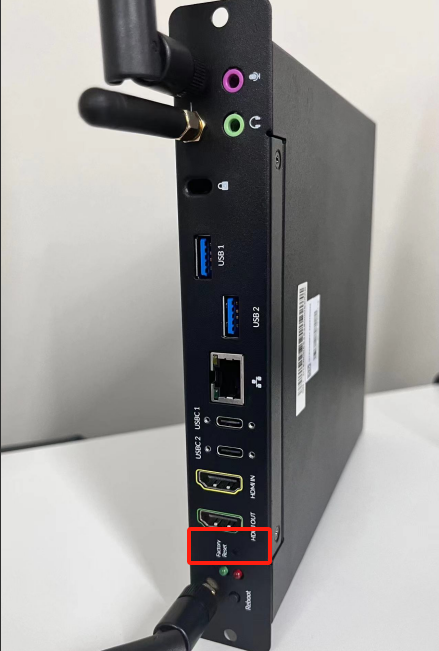
- Wait for the Device to Reboot: The device will automatically restart and begin the factory reset process.
Important Notes:
- Data Loss: A forced factory reset will erase all data on your device, including settings, apps, and user data. Please back up any important data before proceeding.
- Reset Time: The reset process may take several minutes. Please be patient.
- Post-Reset Configuration: After the reset, you will need to reconfigure your device, including connecting to Wi-Fi and setting up your accounts.
If you encounter any problems during the forced factory reset process, please contact DTEN support team [How to contact DTEN Support] for further assistance.
Was this article helpful?
That’s Great!
Thank you for your feedback
Sorry! We couldn't be helpful
Thank you for your feedback
Feedback sent
We appreciate your effort and will try to fix the article