
OVERVIEW
This article provides an overview of the Windows 11 upgrade process for DTEN D7X Windows devices. It outlines the eligibility criteria and the procedure to request the upgrade. For a detailed upgrade plan and specific instructions, please contact DTEN Support.
Preconditions
Your DTEN device is eligible for the Win11 upgrade if it meets one of the following conditions:
- The device has an active (in-warranty) DTEN Pro license.
-
The device is currently under the manufacturer's warranty.
Note: It is recommended to update the firmware (OS version) to latest one before the Win11 upgrade.
Supported model:
- DTEN D7X 55’’ &75’’ Windows
- DTEN D7X 75’’ Dual Windows
How to Request the Windows 11 Upgrade
Steps:
- Submit a request through the DTEN Help Center according to this guide: How to Contact DTEN for Support – DTEN Help Center.
- When creating your ticket, please specify that you are requesting a "Windows 11 upgrade for a DTEN D7X device."
-
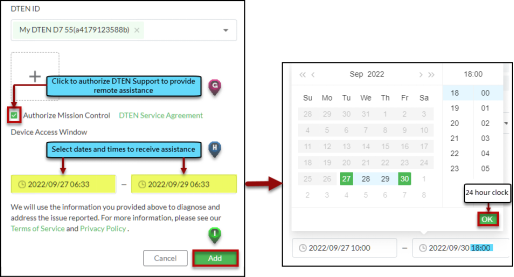
Note: To prevent any processing delays, please ensure you have checked pre-authorize Mission Control before submitting your ticket.
Getting Help
If you have additional questions, please contact DTEN Support at 1 (866) 936-3836 or click here.
Was this article helpful?
That’s Great!
Thank you for your feedback
Sorry! We couldn't be helpful
Thank you for your feedback
Feedback sent
We appreciate your effort and will try to fix the article